


Command Line Usage
Every major action you do from the Exportizer interface can be also done from the command line which is useful for scheduled jobs, scripts, or triggering exports from another application.
New to this? Start here:
exptizer.exe /export /ExportType=EXCELXLSX "/SrcDB=C:\data\sales.dbf" "/TrgDB=C:\out\sales.xlsx"This call opens sales.dbf and exports it to sales.xlsx. Everything else on this page is a variation on this pattern: open a source → describe a target → add options.
Don't want to hand-write switches? Use Export | Build Command Line... in the GUI — it generates a working command line from the same dialog you'd use for a normal export. Jump to that section
If you need something the builder can't produce (e.g. batch jobs), keep reading — the full switch reference is below, organized by what it controls. Remember to check more detailed information about specific export options when needed.
Command line parameters and their descriptions
Building Command Line Easily
Advanced users can build the needed command line manually using the full specification below.
But if you are a beginner or need to create a command line without diving into details, you can save your time using Exportizer command line builder. The command line builder interface is very similar to the standard Export dialog and uses the same export options, but it produces a command line string instead of running export operation.
Here is an instruction on how to create a command line with minimum manual work:
- Open a database, from which you want to export data.
- Prepare needed datasets (tables and/or SQL query results), from which you want to export data:
- To export data from one table, just click the table name in the table list to open its data.
- To export data from several tables (Exportizer Enterprise), click Select Tables button
 and choose needed tables in the list.
 - To export data from a SQL query result (Exportizer Pro and Exportizer Enterprise), create a SQL window, then type and execute your SQL code.
- To export data from several SQL query results or a mix of tables and queries (Exportizer Enterprise), open all needed tables and query results one by one.
- Choose the action to generate command line:
- Simple way for very beginners; exporting one dataset only. Click Build Command Line button
 or choose Export | Build Command Line... menu. In Build command line... window, specify needed export options and click OK. A new window will appear with the command line generated.
 - Advanced way. Choose needed export action from Export menu:
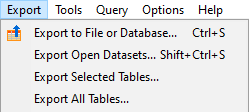 In Export dialog, specify needed export options, then click Tools button and choose Save Action File...:
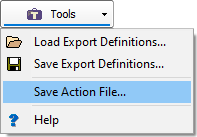 A new window will appear where you can choose between the generated action file or classic command line.
- Simple way for very beginners; exporting one dataset only. Click Build Command Line button
Please note that the command line builder cannot generate the command line of any complexity. But created command line can be easily extended by adding additional command line options from the specification below.
Notes
Using Environment Variables
In the command line and the files it uses (SQL files or field and table mappings files), it is possible to use environment variables. This greatly increases flexibility of the command line and ability to reuse it.
Understanding Command Line Specification
- Ancillary characters in specification. In the specification below, the switches and parameters or their parts, enclosed in square brackets [], are optional, and the switches and parameters, enclosed in arrow brackets <>, are required. Symbol | separates exclusive switches (which cannot be used together) or possible values for some switches. Attention! It is strongly not recommended to use these characters inside parameters of your command line.
- Special highlighting in specification. In the specification below, possible values for some parameters or explanation of the values are color-highlighted. Switches and parameter names are highlighted by bold font.
Writing Command Line
- Command line syntax. You must precede all options (unless otherwise noted) with either a dash (-) or a slash (/). The options are case insensitive.
- File names in parameters. It is recommended to use full file names in all parameters where file names are used.
- Quotes in parameters. Command line may include quotes if they surround parameters containing spaces. But if your command line parameter value contains quote characters inside it, either use the action file or replace each quote character with " character combination.
Usage
Classic command line format
The command line consists of all needed switches and parameters:
exptizer.exe /Parameter1 /Parameter2 /... /ParameterN
Short format (using an action file)
This format is more flexible and secure. The command line parameters are kept in a separate action file. The command line consists of the /ActionFile parameter (which points to the action file path) and an optional /silent (Exportizer Pro and Exportizer Enterprise only) switch:
exptizer.exe [/silent] /ActionFile=ActionFileName
Command Line Parameters and Their Descriptions
- Inline switches or an action file?
- Choosing an action
- Connecting to the source
- Preparing the source
- Connecting to the target
- Choosing the export format and options
- Field and mappings
- Logging & error handling
- Behavior switches
Inline switches or an action file?
Every other switch on this page — including [/e[xport]] and [/c[opy]] — can be written directly on the command line, or placed inside a text file referenced by [/ActionFile. Decide this first, since it determines where the rest of the switches you pick actually go.
| Parameter | Purpose | Editions |
|---|---|---|
| [/ActionFile=Value] | Load all parameters from a file - see below | All |
| [/silent] | Suppress the GUI; run and exit without prompts - see below | Pro, Enterprise |
More details
Specifies the path to action file, which contains command line parameters, one parameter per line.
Lines with a semicolon at the beginning are ignored as comments. Blank lines are allowed.
Notes
- When using this option, there should not be other command line parameters in the command line except /silent switch.
- If the file path includes spaces, enclose entire parameter in quotes.
Run the application in silent mode, without any windows (except purchase reminder in Exportizer Pro and Exportizer Enterprise when the application is used without registration after the end of the test period).
The application returns an exit code of 0 if the working was successful, and 1 in case of error.
Notes
- When using /ActionFile option, /silent switch must be outside parameters (action) file.
- Attention! There are no overwrite or other prompts in this mode.
Choosing an action
By default, a command line with no [/e[xport]] or [/c[opy]] switch simply **opens** the specified database in the Exportizer GUI — useful for quickly viewing a file without doing anything else.
Add one of these two switches if you want the command line to do something automatically instead of just opening the GUI:
| Parameter | Purpose | Editions |
|---|---|---|
| *(none)* | Just open the source in the GUI — no export or copy happens | All |
| [/e[xport]] | Export data to a file or another database — the switches in every other section apply only when this is used | All |
| [/c[opy]] | Copy data from the current row to the clipboard as a name-value list, instead of exporting | All |
Connecting to the source
| Parameter | Purpose | Editions |
|---|---|---|
| </SrcDB=Value> | Source location - see below | All (format varies by edition) |
| </SrcDBRegName=Value> | Use a GUI-registered database - see below | All |
| [/SrcDBInterface=Value] | Connection engine - see below | All (value varies by edition) |
| [/SrcDBKind=Value] | Source database kind - see below | All (value varies by edition) |
| [/SrcDBDriver=Value] | Source database driver - see below | All |
| </SrcDBUserName=Value> | Database user name - see below | Pro, Enterprise |
| </SrcDBPassword=Value> | Database password - see below | All |
| [/SrcServer=Value] | Server address of source database - see below | Enterprise |
| [/SrcPort=Value] | TCP/IP port of source database - see below | Enterprise |
| [/SrcProtocol=Value] | Protocol to connect to the source database - see below | Enterprise |
| [/SrcOSAuthentication] | Use OS authentication instead of database authentication - see below | Enterprise |
| [/SrcAuthenticationMode=Value] | Authentication mode for the source database - see below | Enterprise |
| [/SrcVendorLibrary=Value] | Path to the client library of the database vendor for the source database - see below | Enterprise |
| [/SrcVendorHomepath=Value] | Path to the client home directory of the database vendor for the source database - see below | Enterprise |
| [/SrcSystemDB=Value] | Path to the system database file for the source Access database - see below | Enterprise |
| [/SrcStringFormat=Value] | String format for the source Access or SQLite database - see below | Enterprise |
| [/SrcCharset=Value] | Character set for the source database - see below | Enterprise |
| [/SrcSharedCache=Value] | Shared cache usage for the source SQLite database - see below | Enterprise |
| [/SrcBlockingMode=Value] | Blocking mode for the source SQLite database - see below | Enterprise |
| [/SrcReadOnly] | Open the source Access database in read-only mode - see below | Enterprise |
| [/SrcTableName=Value] | Source table name to open - see below | All |
| [/SrcSQLFile=Value] | File path to SQL query to open - see below | Pro, Enterprise |
| [/SQLParamNames=Value] | SQL query parameters - see below | Pro, Enterprise |
| [/SQLParamValues=Value] | SQL parameter values - see below | Pro, Enterprise |
| [/SQLParamTypes=Value] | SQL parameter types - see below | Pro, Enterprise |
| [/SQLMacroNames=Value] | SQL macros - see below | Pro, Enterprise |
| [/SQLMacroValues=Value] | SQL macro values - see below | Pro, Enterprise |
More details
Specifies the name of the source database. Depends on your Exportizer edition:
| Edition | Accepts |
|---|---|
| Exportizer | Folders (containing local files like .dbf), plus Excel and HTML files |
| Exportizer Pro | Folders, ODBC DSNs, Excel and HTML files |
| Exportizer Enterprise | All four: folders, multi-table files, ODBC DSNs, and ADO connection strings. This parameter can be omitted if /SrcDBInterface=FD parameter is used and other command line parameters fully describe the source database. |
Notes
- If you're just opening a file (not exporting), you can drop the SrcDB= prefix entirely and pass the path as a bare argument.
- If the path contains spaces, wrap the whole parameter in quotes: "/SrcDB=C:\my db\dbf files" — not just the path portion.
Specifies the name (alias) of the source database as it appears in the list of databases, registered in GUI. This way of specifying the source database has several benefits:
- Shorter command line. There is no need to specify other command line parameters describing the source database, because all database parameters are taken from GUI database list. Note: when using other command line parameters describing the source database, they will override the parameters from GUI database list.
- More security. The database passwords in GUI database list are encrypted. If you saved the database password in GUI, you may omit it in the command line.
But the disadvantage of this way is that the command line depends on GUI settings and cannot be easily deployed to another computer.
Notes
- If the name includes spaces, enclose entire parameter in quotes.
Specifies database interface (database engine) used to connect the source database. Depends on your Exportizer edition:
| Edition | Accepts |
|---|---|
| Exportizer, Exportizer Pro | ADO, BDE |
| Exportizer Enterprise | All four: ADO, FD, INTERBASE, BDE |
If not specified, ADO is used.
Specifies the source database kind. If not specified, the application will try to detect it automatically. Depends on your Exportizer edition:
| Edition | Accepts |
|---|---|
| Exportizer | FOLDER, FILE |
| Exportizer Pro | FOLDER, FILE, DSN |
| Exportizer Enterprise | All four: FOLDER, FILE, DSN, CONSTR |
Notes
- CONSTRcan be used only for ADO interface (see /SrcDBInterface).
- Instead of using this parameter, it is possible to use a prefix specifying the database kind (file, folder, ODBC DSN, connection string) in the /SrcDB parameter. The prefix must be enclosed in arrow brackets <>. Possible values: <FILE>, <FOLDER>, <DSN>, <CONSTR>. It is recommended to enclose the entire parameter in quotes in such cases. See example 13.
Specifies the source database driver. Examples: ACCESS, DBASE, INTERBASE, FIREBIRD, ORACLE, SQL SERVER, etc. If not specified, the application will try to detect it automatically.
Notes
- If the driver name contains spaces, wrap the whole parameter in quotes: "/SrcDBDriver=Microsoft Access".
User name to connect the source SQL database.
Notes
- If the user name contains spaces, wrap the whole parameter in quotes.
Password to connect the source Paradox or SQL database.
Notes
- If the driver name contains spaces, wrap the whole parameter in quotes.
Specifies the server address of source database for DB2, SQL Server, Advantage, Informix, Interbase, Firebird, MySQL, PostgreSQL, SQL Anywhere databases.
Notes
- Can be used only with /SrcDBInterface=FD option.
The TCP/IP port of source database on which the DB2, Advantage, PostgreSQL, MySQL, Interbase, or Firebird database server is listening.
Notes
- Can be used only with /SrcDBInterface=FD option.
Specifies the protocol used to connect to the source database of type DB2, Firebird, or Interbase.
Notes
- Can be used only with /SrcDBInterface=FD option.
Tells the application to use OS authentication instead of database authentication for the source database.
Notes
- Can be used only with /SrcDBInterface=FD option.
[/SrcAuthenticationMode=Value]
Specifies authentication mode for the source database of type Oracle. Possible values: Normal, SysDBA, SysOper, etc. Read Oracle documentation for more information.
Notes
- Can be used only with /SrcDBInterface=FD option.
Path to the client library of the database vendor for the source database.
Notes
- Can be used only with /SrcDBInterface=FD option.
Path to the client home directory of the database vendor for the source database.
Notes
- Can be used only with /SrcDBInterface=FD option.
Specifies the path to the system database file for the source Access database.
Notes
- Can be used only with /SrcDBInterface=FD option.
Specifies the string format for the source Access or SQLite database. Possible values: Choose, Unicode, ANSI.
Notes
- Can be used only with /SrcDBInterface=FD option.
Specifies the character set for the source database of type Oracle, PostgreSQL, Informix, MySQL, Interbase, Firebird. Example: UTF8.
Notes
- Can be used only with /SrcDBInterface=FD option.
Specifies either to use shared cache for the source SQLite database. Possible values: False, True.
Notes
- Can be used only with /SrcDBInterface=FD option.
Specifies the blocking mode for the source SQLite database. Possible values: Exclusive, Normal.
Notes
- Can be used only with /SrcDBInterface=FD option.
Tells the application to open the source Access database in read-only mode.
Notes
- Can be used only with /SrcDBInterface=FD option.
Specifies a source table name to open. If this parameter is omitted and the source is file, the application will try to extract it from /SrcDB value.
It can be a file (table) mask or file (table) list instead of a file (table) name to force the application to open and export group of files (tables) consequently (Enterprise); in this case, /TrgTableName must be empty or contain the corresponding mask or list, with one exception: if target format is DATABASE and export mode is APPEND, /TrgTableName can contain only one table (in this case all source table should have compatible field structure). This extended syntax is applicable only if /e[xport] option is used. A <MASK> prefix should be used for masks and a <LIST> prefix should be used for lists (entire parameter must be enclosed in quotes in this case). Lists must be semicolon separated.
Notes
- If the name includes spaces, enclose entire parameter in quotes.
- This parameter cannot be used together with /SrcSQLFile parameter.
Specifies a file name with SQL query to open.
Notes
- If the name includes spaces, enclose entire parameter in quotes.
- This parameter cannot be used together with /SrcTableName parameter.
Can be used in cases, when /SrcSQLFile contains a parameterized SQL query. SQL text of parameterized query contains parameter(s) for dynamic replacement; each SQL parameter starts with colon, for example, :ITEMID, :PAYDATE and so on. Use this parameter to define a list of SQL parameter names, which should be automatically replaced before the query execution. This list must contain SQL parameter names (the colon must be omitted here) separated by %#% character combination.
Notes
- If the parameter contains spaces, it should be enclosed in quotes.
- This parameter must be used in conjunction with /SQLParamValues and /SQLParamTypes parameters.
List of SQL parameter values separated by %#% character combination. The number of items in the list and their positions must match the ones from /SQLParamNames parameter. To pass null value, text of the value should be NULL (in upper case).
Notes
- If the parameter contains spaces, it should be enclosed in quotes.
List of SQL parameter types separated by %#% character combination. The number of items in the list and their positions must match the ones from /SQLParamNames parameter. Available types: Boolean, Currency, Date, DateTime, Float, Integer, SmallInt, String, Time, Word.
Notes
- The parameter should not contain spaces.
Can be used in cases, when /SrcSQLFile contains an SQL query with macros. SQL text of such queries contains macro(s) for dynamic replacement; each macro starts with << and ends with >>, for example, <<ITEMID>>, <<PAYDATE>> and so on; unlike parameter, macro does not have a type and is always inserted as text. Use this parameter to define a list of macro names, which should be automatically replaced before the query execution. This list must contain macro names (separators << and >> must be omitted here; macro name should contain only alphanumeric characters) separated by %#% character combination. The macros are processed before processing of parameters; therefore it is possible to use macros inside parameters.
Notes
- If the parameter contains spaces, it should be enclosed in quotes.
- This parameter must be used in conjunction with /SQLMacroValues parameter.
List of SQL macro values separated by %#% character combination. The number of items in the list and their positions must match the ones from /SQLMacroNames parameter.
Notes
- If the parameter contains spaces, it should be enclosed in quotes.
Preparing the source
| Parameter | Purpose | Editions |
|---|---|---|
| [/filter=Value] | Filter criteria - see below | All |
| [/FilterSensitive] | Filter criteria is case sensitive - see below | All |
| [/FilterPartial] | Filter criteria can match partially - see below | All |
| [/sort=Value] | List of fields to order the source dataset by - see below | All |
| [/ColDefsFile=Value] | Path to columns definitions file - see below | Pro, Enterprise |
| [/LiveDataWindow] | Open the source table in memory saving mode - see below | Enterprise |
| [/FetchSize=Value] | Count of records to fetch - see below | Enterprise |
More details
Filter condition, which must be applied to the source dataset after its opening.
Notes
- Filter condition that includes spaces must be enclosed in quotes.
Specifies that the literal strings in the filter condition for source database are compared to string-valued fields case-sensitively. Ignored, if /filter option is not specified.
Specifies that the strings in filter condition for source database that end in an asterisk signify a partial string match with the asterisk matching any number of characters. Ignored, if /filter option is not specified.
Notes
- This option does not work for ADO interface.
List of fields (or relative positions of the fields), by which the source database should be sorted. Field names (positions) must be separated by commas.
ASC and DESC modifiers can be used to sort in ascening or descending order, respectively; ASC is default. In this example, the sorting is done by two fields: by payername (in ascending order) first and then by paymentsum (in descending order).
Notes
- If the list contains spaces, enclose entire parameter in quotes.
Specifies the columns definitions file to load for the open dataset. Using column definitions can affect the data exporting output, especially when exporting data to HTML, PDF, EXCELXLSX, ODS, EXCELOLE, WORDOLE, and RTF target formats along with /UseGUIViewSettings switch.
Notes
- This option is ignored in silent mode.
Opens the source table in memory saving mode. Useful for exporting very large tables which can cause operating memory overflow in normal mode.
Notes
- This option works in conjunction with /SrcDBInterface=FD and /SrcTableName options.
- Consider using /FetchSize parameter to improve the performance.
Specifies the count of records to fetch at a single fetch operation. It can affect the export speed, especially when /LiveDataWindow switch is used. If this parameter is omitted or set to 0, the database default value is used.
- This option works in conjunction with /SrcDBInterface=FD option.
Connecting to the target
| Parameter | Purpose | Editions |
|---|---|---|
| </TrgDB=Value> | Target location - see below | All (format varies by edition) |
| </TrgDBRegName=Value> | Use a GUI-registered database - see below | All |
| [/TrgDBInterface=Value] | Connection engine - see below | All (value varies by edition) |
| [/TrgDBKind=Value] | Target database kind - see below | All (value varies by edition) |
| [/TrgDBDriver=Value] | Target database driver - see below | All |
| </TrgDBUserName=Value> | Database user name - see below | Pro, Enterprise |
| </TrgDBPassword=Value> | Database password - see below | All |
| [/TrgServer=Value] | Server address of target database - see below | Enterprise |
| [/TrgPort=Value] | TCP/IP port of target database - see below | Enterprise |
| [/TrgProtocol=Value] | Protocol to connect to the target database - see below | Enterprise |
| [/TrgOSAuthentication] | Use OS authentication instead of database authentication - see below | Enterprise |
| [/TrgAuthenticationMode=Value] | Authentication mode for the target database - see below | Enterprise |
| [/TrgVendorLibrary=Value] | Path to the client library of the database vendor for the target database - see below | Enterprise |
| [/TrgVendorHomepath=Value] | Path to the client home directory of the database vendor for the target database - see below | Enterprise |
| [/TrgSystemDB=Value] | Path to the system database file for the target Access database - see below | Enterprise |
| [/TrgStringFormat=Value] | String format for the target Access or SQLite database - see below | Enterprise |
| [/TrgCharset=Value] | Character set for the target database - see below | Enterprise |
| [/TrgSharedCache=Value] | Shared cache usage for the target SQLite database - see below | Enterprise |
| [/TrgBlockingMode=Value] | Blocking mode for the target SQLite database - see below | Enterprise |
More details
Specifies the name of the target file or database. Depends on your Exportizer edition:
| Edition | Accepts |
|---|---|
| Exportizer | Folders (containing local files like .dbf), plus Excel and HTML files |
| Exportizer Pro | Folders, ODBC DSNs, Excel and HTML files |
| Exportizer Enterprise | All four: folders, multi-table files, ODBC DSNs, and ADO connection strings. This parameter can be omitted if /TrgDBInterface=FD parameter is used and other command line parameters fully describe the source database. |
Notes
- If the path contains spaces, wrap the whole parameter in quotes: "/TrgDB=C:\my db\dbf files\target.dbf" — not just the path portion.
Specifies the name (alias) of the target database as it appears in the list of databases, registered in GUI. This way of specifying the target database has several benefits:
- Shorter command line. There is no need to specify other command line parameters describing the target database, because all database parameters are taken from GUI database list. Note: when using other command line parameters describing the target database, they will override the parameters from GUI database list.
- More security. The database passwords in GUI database list are encrypted. If you saved the database password in GUI, you may omit it in the command line.
But the disadvantage of this way is that the command line depends on GUI settings and cannot be easily deployed to another computer.
Notes
- If the name includes spaces, enclose entire parameter in quotes.
Specifies database interface (database engine) used to connect the target database. Depends on your Exportizer edition:
| Edition | Accepts |
|---|---|
| Exportizer, Exportizer Pro | ADO, BDE |
| Exportizer Enterprise | All four: ADO, FD, INTERBASE, BDE |
If not specified, ADO is used.
Specifies the target database kind. If not specified, the application will try to detect it automatically. Depends on your Exportizer edition:
| Edition | Accepts |
|---|---|
| Exportizer | FOLDER, FILE |
| Exportizer Pro | FOLDER, FILE, DSN |
| Exportizer Enterprise | All four: FOLDER, FILE, DSN, CONSTR |
Notes
- CONSTRcan be used only for ADO interface (see /TrgDBInterface).
- Instead of using this parameter, it is possible to use a prefix specifying the database kind (file, folder, ODBC DSN, connection string) in the /TrgDB parameter. The prefix must be enclosed in arrow brackets <>. Possible values: <FILE>, <FOLDER>, <DSN>, <CONSTR>. It is recommended to enclose the entire parameter in quotes in such cases.
Specifies the target database driver. Examples: ACCESS, DBASE, INTERBASE, FIREBIRD, ORACLE, SQL SERVER, etc. If not specified, the application will try to detect it automatically.
Notes
- If the driver name contains spaces, wrap the whole parameter in quotes: "/TrgDBDriver=Microsoft Access".
User name to connect the target SQL database.
Notes
- If the user name contains spaces, wrap the whole parameter in quotes.
Password to connect the target Paradox or SQL database.
Notes
- If the driver name contains spaces, wrap the whole parameter in quotes.
Specifies the server address of target database for DB2, SQL Server, Advantage, Informix, Interbase, Firebird, MySQL, PostgreSQL, SQL Anywhere databases.
Notes
- Can be used only with /TrgDBInterface=FD option.
The TCP/IP port of target database on which the DB2, Advantage, PostgreSQL, MySQL, Interbase, or Firebird database server is listening.
Notes
- Can be used only with /TrgDBInterface=FD option.
Specifies the protocol used to connect to the target database of type DB2, Firebird, or Interbase.
Notes
- Can be used only with /TrgDBInterface=FD option.
Tells the application to use OS authentication instead of database authentication for the target database.
Notes
- Can be used only with /TrgDBInterface=FD option.
[/TrgAuthenticationMode=Value]
Specifies authentication mode for the target database of type Oracle. Possible values: Normal, SysDBA, SysOper, etc. Read Oracle documentation for more information.
Notes
- Can be used only with /TrgDBInterface=FD option.
Path to the client library of the database vendor for the target database.
Notes
- Can be used only with /TrgDBInterface=FD option.
Path to the client home directory of the database vendor for the target database.
Notes
- Can be used only with /TrgDBInterface=FD option.
Specifies the path to the system database file for the target Access database.
Notes
- Can be used only with /TrgDBInterface=FD option.
Specifies the string format for the target Access or SQLite database. Possible values: Choose, Unicode, ANSI.
Notes
- Can be used only with /TrgDBInterface=FD option.
Specifies the character set for the target database of type Oracle, PostgreSQL, Informix, MySQL, Interbase, Firebird. Example: UTF8.
Notes
- Can be used only with /TrgDBInterface=FD option.
Specifies either to use shared cache for the target SQLite database. Possible values: False, True.
Notes
- Can be used only with /TrgDBInterface=FD option.
Specifies the blocking mode for the target SQLite database. Possible values: Exclusive, Normal.
Notes
- Can be used only with /TrgDBInterface=FD option.
Choosing export format and options
| Parameter | Purpose | Editions |
|---|---|---|
| [/ExportType=Value] | Target export format - see below | All |
| [/ExportMode=Value] | Export mode - see below | All |
| [/SuppressOverwriteOrDeletePrompt] | Suppress file/table overwrite prompt - see below | All |
| [/dbfVersion=Value] | Version (level) for DBF target format: 3, 4, 5 (default 3) | All |
| [/AppendTimestamp] | Append current timestamp to the end of the target file name - see below | All |
| [/[Include]Memo] | Include contents of MEMO/CLOB (large text) fields - see below | All |
| [/[Include]ColNames] | Include column names - see below | All |
| [/[Include]Images] | Export graphic data from BLOB fields - see below | Pro, Enterprise |
| [/TextSchema=Value] | Schema for TEXT target format: standard (or 0), ado (or 1), bde (or 2) (default standard or 0) | All |
| [/FixedFieldLength] | Target text file has fixed field length - see below | All |
| [/separator=Value] | Field separator for TEXT target format - see below | All |
| [/QuoteChar=Value] | Quote character for TEXT target format - see below | All |
| [/QuoteAllFields] | Quoting all fields for TEXT target format - see below | All |
| [/XmlSchema=Value] | Schema for XML target format - see below | All |
| [/XmlUseCDataAttr] | use CDATA attribute in text data for XML target format - see below | All |
| [/TrimTrailingSpaces] | Trim trailing spaces and control characters - see below | All |
| [/CreateIndexFile] | Create a separate index file for multi-table export for HTML target format - see below | Enterprise |
| [/AppendAsTable] | Process Append export mode for HTML target format as adding a new HTML table - see below | Enterprise |
| [/TemplateFile=Value] | Path to template file for HTML target format - see below | All |
| [/ExportStepNo=Value] | current export step for HTML target format - see below | All |
| [/UseRawData] | Use raw data for HTML, JSON, EXCELXLSX, and ODS target formats. | All |
| [/AddAutofilter] | Add autofilter for all columns for EXCELXLSX and ODS target format | All |
| /CellBorders=Value | Cell border style for EXCELXLSX, ODS, HTML, and PDF target formats: None, Thin, Medium, Thick (default None) | All |
| [/DocTitle=Value] | Document title for HTML target format - see below | All |
| [/UseGUIViewSettings] | Use GUI table view settings (fonts and colors) for target tables for HTML, PDF, EXCELXLSX, ODS, EXCELOLE, WORDOLE, and RTF - see below | All |
| [/AlternateRowColor=Value] | Alternate row color (background color of even rows) for HTML, PDF, EXCELXLSX, ODS, EXCELOLE, WORDOLE, and RTF target formats - see below | All |
| [/TableTitleFont=Value] | Font of the table title for HTML, PDF, EXCELXLSX, ODS, EXCELOLE, WORDOLE, and RTF target formats - see below | All |
| [/ColumnHeadersFont=Value] | Font of the column headers for HTML, PDF, EXCELXLSX, ODS, EXCELOLE, WORDOLE, and RTF target formats - see below | All |
| [/RowsFont=Value] | Font of the target data rows for HTML, PDF, EXCELXLSX, ODS, EXCELOLE, WORDOLE, and RTF target formats - see below | All |
| [/TargetImageFormat=Value] | Format of target images for HTML target format - see below | Pro, Enterprise |
| [/LimitRecordCount=Value] | Maximum number of records to be exported - see below | All |
| [/RecordsPerLine=Value] | Number of source records to be placed per one target line - see below | All |
| [/RowsPerSheet=Value] | Number rows in one sheet for EXCELXLSX, ODS and EXCELXML target formats - see below | All |
| [/SheetName=Value] | Name of target sheet to place the source data in for EXCELXLSX and ODS target formats (default Sheet1) | All |
| [/RangeName=Value] | Name of target cell range with exported data (including column headers) for EXCELXLSX and ODS target formats (default is empty name) | All |
| [/TableTitle=Value] | Table title, i.e. text to be shown above the table data in the target document, for EXCELXLSX, ODS, EXCEL, EXCELXML, EXCELOLE, WORDOLE, HTML, PDF, RTF target formats | All |
| [/TableId=Value] | Value for id attribute of HTML Table tag for HTML target format | All |
| [/FloatFormat=Value] | Format for numbers with floating points for EXCELXML target format | All |
| [/DateTimeFormat=Value] | Format for DateTime values for EXCELXML target format | All |
| [/AddBlocks] | Continue the output on the columns to the right when reaching the row limit (65536) for EXCEL (XLS) target format (default behavior: exporting process will stop on reaching the row limit of 65536) | All |
| [/BlockGap] | Add gaps between the blocks of columns when exporting more than 65536 rows for EXCEL target format; works together with /AddBlocks switch | All |
| [/LineTerminator=Value] | Style of line terminator in target file: WINDOWS, MAC, or UNIX; ignored for binary target formats | All |
| [/encoding=Value] | Target encoding - see below | All |
| [/NoBOM] | Not to include BOM (byte order mark) when using Unicode encoding | All |
| [/CommitInterval=Value] | COMMIT command frequency - see below | All |
| [/MemorySaving] | Use memory saving mode for DATABASE export format - see below | Pro, Enterprise |
| [/UseSQLParameters] | Use SQL parameters in memory saving mode for DATABASE export format - see below | Pro, Enterprise |
| [/UseBatchMode] | COMMIT command frequency - see below | Pro, Enterprise |
| /CreateTargetSchema | Create target schema (if it does not exist yet) for DATABASE export format; currently, applies only to PostgreSQL, SQL Server, DB2, and MySQL databases | Pro, Enterprise |
| /SQLBefore=Value | SQL code to add (SQL export format) or execute (DATABASE) before the start of exporting | SQL - All, DATABASE - Enterprise |
| /SQLAfter=Value | SQL code to add (SQL export format) or execute (DATABASE) after the end of exporting | SQL - All, DATABASE - Enterprise |
| [/CreateTargetContainer] | Create the target container if it does not exist - see below | All |
| [/TrgTableName=Value] | Target table name for DATABASE export format - see below | Enterprise |
| [/TrgTableDescription=Value] | Target table description for DATABASE and SQL export formats - see below | SQL - All, DATABASE - Enterprise |
| [/sqlSeparator=Value] | SQL command separator for SQL target format - see below | All |
| [/AddDDL] | Add DDL statement into the output script before INSERT or MERGE statements for SQL target format - see below | All |
| [/EmptyTable] | Add TRUNCATE (if supported by target database) or DELETE statement into the output script before INSERT or MERGE statements for SQL target format - see below | All |
| [/DropTable] | Add DROP TABLE statement into the output script before INSERT or MERGE statements for SQL target format - see below | All |
| [/DDLCheckExistence] | Add IF NOT EXISTS clause in CREATE TABLE statement, and IF EXISTS clause in DROP TABLE statement for SQL target format - see below | All |
| [/TargetDBType=Value] | Target database type for SQL target format - see below | All |
| [/sqlTableName=Value] | Table name for SQL target format - see below | All |
| [/sqlStatementType=Value] | SQL statement type for SQL target format: INSERT, BATCHINSERT, COPY (only if /TargetDBType is PostgreSQL), MERGE, UPDATE, or DELETE (default INSERT) | All |
More details
Specifies the target format. Possible values:
| TEXT | export to text file (delimited or fixed-length) |
| JSON | export to file in JSON format |
| HTML | export to HTML document |
| XML | export to XML document |
| RTF | export to RTF file |
| export to PDF file (binary file) | |
| EXCEL | export to Excel 97-2003 workbook (binary file) |
| EXCELXLSX | export to Excel 2007+ workbook (XLSX) |
| ODS | export to OpenDocument Spreadsheet (ODS) |
| DBF | export to dBase table (binary file) |
| SQL | export to SQL Script file |
| CUSTOM | export to file with user defined format |
| EXCELXML | export to Excel workbook (XML-based) |
| DATABASE | export to relational database of any type (Pro, Enterprise) |
| SYLK | export to SYLK file |
| EXCELOLE | export to Excel workbook using OLE (binary file) |
| WORDOLE | export to Word document using OLE (binary file) |
If this parameter is omitted or erroneous, the application tries to define it from /TrgDB. TEXT format is used by default. DBF, PDF, EXCEL, EXCELXLSX, ODS, EXCELOLE, WORDOLE and DATABASE target formats should not be used with /c[opy] option due to their binary nature.
Specifies export mode. Possible values:
|
CREATE+INSERT Target is created and filled with incoming rows; if target already exists, export fails. |
|
REPLACE+INSERT Target is created and filled with incoming rows; if target already exists, it is overwritten. |
|
CREATE_OR_REPLACE Blank target (using appropriate structure) is created; if target already exists, it is overwritten. |
|
APPEND (Pro, Enterprise) Target is appended with incoming rows; if target does not exists, it is created. Notes |
|
EMPTY+INSERT (Pro, Enterprise) Target is emptied before inserting incoming rows; if target does not exists, it is created. Notes |
|
UPDATE (Pro, Enterprise) The records in the target that match incoming records, are replaced with incoming records. Notes |
|
APPEND+UPDATE (Pro, Enterprise) The records in the target that match incoming records, are replaced with incoming records. Unmatched incoming records are appended to the target. Notes |
|
DELETE (Pro, Enterprise) The records in the target that match incoming records, are deleted. Notes |
If not specified, CREATE+INSERT is used.
[/SuppressOverwriteOrDeletePrompt]
Suppresses file/table overwrite prompt for REPLACE+INSERT and CREATE_OR_REPLACE export mode or table emptying prompt for EMPTY+INSERT export mode.
Notes
- Attention! This option is ignored in silent mode.
Instructs to append current timestamp to the end of the target file name. The timestamp mask is _YYYYMMDD_HH24MISS. Example of the produced file name: C:\Reports\Payments_20241220_150301.html. Ignored for DATABASE target format.
Instructs to include contents of MEMO/CLOB (large text) fields when exporting. Without this switch, when such a field is present in the fields to export, a constant describing the field type will be used instead of the field contents. Ignored for DBF, Custom and DATABASE target formats.
Instructs to include field (column) names when exporting. Ignored for DBF, Custom and DATABASE target formats.
Instructs to export graphic data from BLOB fields. Meaningful only for HTML, EXCELXLSX, ODS, RTF, and PDF target formats.
Notes
- Using this option can slow down the exporting process for large datasets.
Specifies that fields in output file have fixed length (without special separators) for TEXT target format. In fixed-length files, field data, which shorter than field width, is completed by spaces.
Notes
- This switch cannot be used together with /separator option.
Specifies the field separator for TEXT target format. Can be any character or character code, followed after # symbol. For example, if you wish to specify a TAB character as the field separator, then /separator=#9 option must be used. If not specified, TAB character is used.
Notes
- This option cannot be used together with /FixedFieldLength switch.
Specifies the quote character for TEXT target format. The quote character is placed around field data if the field data contains embedded field separator(s) or quote character(s), and when more than one field is exported. Embedded quote character is represented by a pair of consecutive quote characters. It can be any character or character code, followed after # symbol. For example, if you wish to specify an apostrophe as the quote character, then /QuoteChar=#39 option must be used. If not specified, double quotes are used.
Notes
- This option cannot be used together with /FixedFieldLength switch.
Forces quoting all fields in target for TEXT target format when more than one field is exported. This option is ignored for fixed-length files.
Specifies the schema for XML target format. Possible values:
| ado or 0 (only for databases, opened by ADO) |
| standard or 1 |
| simple or 2 |
| xsl or 3 |
Default value: standard (1).
Instructs to use CDATA attribute in text data for XML target format (for simple schema only).
Instructs to trim trailing spaces and control characters. Applicable for char and varchar data only. Using this option allows to remove useless data and thus reduce the output volume, improve the target look for some destination formats etc.
Specifies how to process Append export mode for HTML target format. With this switch, if Append export mode is used, the new data will be appended as a separate HTML table in the end of existing target file. If this parameter is omitted, the appending is done to the end of the last found HTML table in the existing file. In the latter case, the field structure of the incoming data must be compatible with the field structure of the HTML table in the existing target file.
Specifies a template file for HTML target format. The export procedure will enrich the template file with data from the current dataset and finally save the enriched template as a target file. Note: when using template, all export option will be ignored except template options, document title, and row count limit.
Specifies the current export step for HTML target format. When using template, export can be performed in several steps, and this option lets the application know which dynamic expressions from the template must be calculated during this step.
Specifies document title for HTML target format.
Notes
- If it includes spaces, enclose entire parameter in quotes.
Instructs to use GUI table view settings (fonts and colors) for target tables for HTML, PDF, EXCELXLSX, ODS, EXCELOLE, WORDOLE, and RTF target formats. This option is ignored in silent mode. Without this option or in silent mode, table(s) in target document will use some default fonts and colors.
Notes
- Using this option can slow down the exporting process for large datasets.
Specifies alternate row color (background color of even rows) for HTML, PDF, EXCELXLSX, ODS, EXCELOLE, WORDOLE, and RTF target formats.
The color must be specified in hexadecimal format, which is made up of sharp symbol (#), followed by three hex numbers, rr, gg, bb, that give values for red, green and blue, respectively; for example, #FF0000 represents pure red.
Notes
- Using this option can slow down the exporting process for large datasets.
Specifies the font of the table title for HTML, PDF, EXCELXLSX, ODS, EXCELOLE, WORDOLE, and RTF target formats.
The font must be represented in the following form: fontname;fontsize;fontstyle;fontcolor. Example: Tahoma;12;Bold Italic;#0000FF.
Notes
- If the value contains spaces, the entire parameter must be enclosed in quotes.
- Using this option can slow down the exporting process for large datasets.
Specifies the font of the column headers for HTML, PDF, EXCELXLSX, ODS, EXCELOLE, WORDOLE, and RTF target formats.
The font must be represented in the following form: fontname;fontsize;fontstyle;fontcolor. Example: Verdana;10;Bold;#800000.
Notes
- If the value contains spaces, the entire parameter must be enclosed in quotes.
- Using this option can slow down the exporting process for large datasets.
Specifies the font of the target data rows for HTML, PDF, EXCELXLSX, ODS, EXCELOLE, WORDOLE, and RTF target formats.
The font must be represented in the following form: fontname;fontsize;fontstyle;fontcolor. Example: Arial;10;Regular;#000000.
Notes
- If the value contains spaces, the entire parameter must be enclosed in quotes.
- Using this option can slow down the exporting process for large datasets.
Specifies format of target images for HTML target format. Possible values: PNG, JPEG, GIF, Bitmap, Metafile, Icon, <SOURCE>; in the last case, the target images will be created in the format which is determined from the source, i.e. no image format conversion is done.
Specifies a maximum number of records to be exported. If this option is not specified or it is less then 1, all records will be exported. If you want just create a file (table) without data exporting, use the corresponding export mode instead.
Specifies the number of source records, which must be placed per one line in target. If not specified or erroneous, 1 is used. This option is ignored for XML, SYLK, DBF, PDF, DATABASE target formats.
Specifies the number rows in one sheet for EXCELXLSX, ODS and EXCELXML target formats. If not specified or erroneous, 800000 is used. When exporting, if the number of outputted rows reached this value, the new sheet is automatically created.
[/encoding=Value]
Encoding for TEXT, XML, HTML, SQL, EXCELXML, ODS, or DBF target format. Possible values for TEXT, XML, EXCELXML, SQL and HTML: ASCII, UTF-8 and so on. Possible values for DBF: DBASE ENU CP437, DBASE DEU CP437, 'ASCII' ANSI and so on (see full list in GUI).
Notes
- If the encoding includes spaces, enclose entire parameter in quotes.
Specifies commit interval (COMMIT command frequency) in records for DATABASE and SQL export formats. Default value: 0 (COMMIT is done at the end).
Enables memory saving mode for DATABASE export format. The memory saving mode may be useful when the source or target tables have very large number of records, especially if target interface is ADO. In addition to memory saving, the improvements in performance may be achieved.
Notes
- This mode might work differently for different target database types/interfaces, therefore it is recommended to test it carefully before using on production environment.
Enables using SQL parameters in memory saving mode for DATABASE export format. Using parameterized SQL queries can significantly speed up the process and allows to export BLOB data for some database types/interfaces.
Enables batch export mode for DATABASE export format. Batch mode reduces the target database workload and increases the speed of export drastically. The size of a batch equals to /CommitInterval.
Notes
- The record level logging might work differently in this mode.
Instructs to create the target container if it does not exist. The target container is a folder or a multi-table database to which the data is exported. Creating a multi-table database is supported in Exportizer Enterprise only and limited to Microsoft Access (.mdb), SQLite, Firebird, and Interbase databases.
Specifies the target table name for DATABASE export format. If this parameter is omitted and the target is file, the application will try to extract it from /TrgDB. If the name includes spaces, enclose entire parameter in quotes.
It can be a file (table) mask or file (table) list instead of a file (table) name for multi-table exporting (Exportizer Enterprise only). In this case, /SrcTableName must contain the corresponding mask or list. A <MASK> prefix should be used for masks and a <LIST> prefix should be used for lists (entire parameter must be enclosed in quotes in this case). Lists must be semicolon separated.
Specifies the target table description for DATABASE and SQL export formats. Currently, the description can be applied to Oracle, SQL Server, PostgreSQL, and MySQL databases. For DATABASE target format, the description is applied only to table, which is created during the export operation. For SQL target format, the description is applied only with /AddDDL switch. If you specify <copy_from_source> as a value, the application will try to use description of the source table (if any), but it requires more time to process.
Notes
- If the value includes spaces, enclose entire parameter in quotes.
Specifies SQL command separator for SQL target format. Can be any character or character code, which follows # symbol. There are also predefined separators:
sqlplus, which is usually used in Oracle SQL Plus utility and other Oracle specific tools and utilities; this is a slash (/) on a separate line between two statements.
mssqlgo, which is usually used in SQL Server tools; this is a GO word on a separate line between two statements.
Default value: semicolon (;).
Instructs to add DDL statement (CREATE TABLE...) into the output script before INSERT or MERGE statements for SQL target format. It should not be used together with /EmptyTable switch.
Instructs to add TRUNCATE (if supported by target database) or DELETE statement into the output script before INSERT or MERGE statements for SQL target format. It should not be used together with /DropTable and /AddDDL switches.
Instructs to add DROP TABLE statement into the output script before INSERT or MERGE statements for SQL target format. It should be used together with /AddDDL switch, and should not be used together with /EmptyTable switch.
Instructs to add IF NOT EXISTS clause in CREATE TABLE statement, and IF EXISTS clause in DROP TABLE statement for SQL target format. It works together with /AddDDL and/or /DropTable switches.
Specifies target database type for SQL target format (e.g. Access, DB2, Oracle etc.). This option lets the application to correctly encode some specific data types in output file (for example, boolean, date, time, and timestamp). If not specified, YYYY-MM-DD hh:mm:ss format (ANSI SQL standard) is used for dates and values are enclosed in single quotation marks; for boolean values, 'T' or 'F' is used.
Specifies table name for SQL target format (used as table name in SQL statements). Ignored when exporting group of files / tables (in this case the table name of the source is used).
Notes
- If the value includes spaces, enclose entire parameter in quotes.
Field and table mappings
| Parameter | Purpose | Editions |
|---|---|---|
| [/KeyFields=Value] | Key fields for UPDATE, DELETE, MERGE commands for SQL and DATABASE target formats - see below | SQL - All, DATABASE - Enterprise |
| [/FieldMappingsFile=Value] | Path to file with source-to-target field mappings - see below | All |
| [/FieldMappingsOverrideFile=Value] | Path to file with source-to-target field mappings overrides for general field mappings - see below | All |
| [/FieldMappings=Value] | Source-to-target field mappings - see below | All |
| [/FieldMappingsOverride=Value] | Source-to-target field mappings overrides for general field mappings - see below | All |
| [/columns=Value] | Columns (fields) to export - see below | All |
| [/FieldSourceToTargetSchema=Value] | Automatically naming schema for target fields when field mappings are not specified - see below | All |
| [/TableMappingsFile=Value] | Path to file with source-to-target table mappings for multi-table export - see below | Enterprise |
More details
Specifies key fields (matching fields) for UPDATE, DELETE, MERGE commands for SQL and DATABASE target formats. This must be a name of a target field or a comma-separated list of several target field names.
For SQL target format, key fields must be specified when /sqlStatementType is MERGE, UPDATE, or DELETE. They are used in the ON (for MERGE) or WHERE (for UPDATE and DELETE) clause of SQL statements.
For DATABASE target format, key fields must be specified when /ExportMode is UPDATE, APPEND+UPDATE, or DELETE.
When field mappings are explicitly specified (in /FieldMappingsFile or /FieldMappings parameters), the key fields must be present there and map to the corresponding fields in target.
Notes
- If the value includes spaces, enclose entire parameter in quotes.
Specifies the name of the file with source-to-target field mappings. The content of the file must conform to the rules for field mappings files. If this option is omitted, /FieldMappings option is used. This option is ignored for multi-table export (i.e. when you specify to export table list instead of one table). This option is ignored if target format is CUSTOM and for multi-table export (i.e. when you specify to export table list instead of one table).
Notes
- If the value includes spaces, enclose entire parameter in quotes.
[/FieldMappingsOverrideFile=Value]
Specifies the name of the file with source-to-target field mappings overrides for general field mappings.
General field mappings can be built using /FieldMappingsFile, /FieldMappings, /columns options, or can be built automatically when these options are omitted. After the general mappings are built, the overrides are merged with them using source field name as a key: not existing items are added, and others overwrite target attributes of existing items.
Use the mappings overrides, when you omit general field mappings options and rely on automatically built mappings (especially useful for datasets with large number of fields), but have a few fields or expressions where the target attributes must not be created automatically.
The rules for this file are identical to rules for /FieldMappingsFile (see above).
This option is ignored if target format is CUSTOM and for multi-table export (i.e. when you specify to export table list instead of one table).
Notes
- If the value includes spaces, enclose entire parameter in quotes.
Specifies source-to-target field mappings. This must be a semicolon-separated list of the mappings. Each mapping must hold a pair of source and target field names separated by equal sign, for example: PaymentId=PAYMENT_ID. Field names should not contain equals and semicolons. If this option is omitted, /columns option is used to determine the source columns to export, and target field names are determined automatically according to rules of target database (when possible). This option is ignored if target format is CUSTOM and for multi-table export (i.e. when you specify to export table list instead of one table).
Notes
- If the value includes spaces, enclose entire parameter in quotes.
[/FieldMappingsOverride=Value]
Specifies source-to-target field mappings overrides for general field mappings. See the explanation of field mappings overrides in the /FieldMappingsOverrideFile description above.
The rules for this option are identical to rules for /FieldMappings (see above).
Notes
- If the value includes spaces, enclose entire parameter in quotes.
Specifies columns (fields) to export. This must be a list of field names or their numeric indexes, separated by semicolons. If not specified, and /FieldMappingsFile and /FieldMappings are omitted too, all source columns are exported, and target field names are determined automatically according to rules of target database (when possible). This option is ignored if target format is CUSTOM and for multi-table export (i.e. when you specify to export table list instead of one table).
Notes
- If the value includes spaces, enclose entire parameter in quotes.
[/FieldSourceToTargetSchema=Value]
Specifies the way of automatically naming target fields when field mappings are not specified. Possible values:
| Auto | Target fields are named using source field names and general naming rules of the target database. |
| Lower | Target fields are named using source field names and general naming rules of the target database, and finally converted to the lower case. |
| Upper | Target fields are named using source field names and general naming rules of the target database, and finally converted to the upper case. |
| MatchSource | Target fields are named exactly as source field names. No validity checks are done. |
Default value: Auto.
Specifies the name of the file, which contains source-to-target table mappings for multi-table export. The content of the file must conform to the rules for table mappings files. If this option is omitted, source and target masks or lists must be specified.
Notes
- This parameter cannot be used together with /SrcTableName and /TrgTableName parameters.
- If the value includes spaces, enclose entire parameter in quotes.
Logging & error handling
| Parameter | Purpose | Editions |
|---|---|---|
| [/LogFile=Value] | Path to file to write export log of the upper level - see below | Pro, Enterprise |
| [/AppendLog] | Append log records to existing log file of the upper level - see below | Pro, Enterprise |
| [/RecordLogFile=Value] | Path to file to write export log of detail (record) level - see below | Pro, Enterprise |
| [/RecordLogExpression=Value] | Formula which result will be written to /RecordLogFile for each exported source record - see below | Pro, Enterprise |
| [/AppendRecordLogFile] | Append log records to existing /RecordLogFile - see below | Pro, Enterprise |
| [/BadRecordLogFile=Value] | Path to file to write export problem log of detail (record) level - see below | Pro, Enterprise |
| [/BadRecordLogExpression=Value] | Formula which result will be written to /BadRecordLogFile for each problem record - see below | Pro, Enterprise |
| [/AppendBadRecordLogFile] | Append log records to existing /BadRecordLogFile - see below | Pro, Enterprise |
| [/ErrorHandlingType=Value] | Record level errors processing type - see below | Enterprise |
| [/CriticalErrorCount=Value] | Critical number of errors, required to stop the exporting process when /ErrorHandlingType=StopCritical | Enterprise |
More details
Name of the file to write export log of the upper level
.Notes
- If the value includes spaces, enclose entire parameter in quotes.
Specifies that if the file from /LogFile already exists, the new log data will be appended to the end of the file.
Notes
- If this switch is omitted, the existing log file will be overwritten.
Name of the file to write export log of detail (record) level.
Notes
- If the value includes spaces, enclose entire parameter in quotes.
- Attention! Using logging of detail level can slow down the exporting process.
Specifies expression which result will be written to file specified by /RecordLogFile for each exported source record.
Notes
- If the value includes spaces, enclose entire parameter in quotes.
Specifies that if the file from /RecordLogFile already exists, the new log data will be appended to the end of the file.
Notes
- If this switch is omitted, the existing log file will be overwritten.
Name of the file to write export problem log of detail (record) level.
Notes
- If the value includes spaces, enclose entire parameter in quotes.
- Attention! Using logging of detail level can slow down the exporting process.
[/BadRecordLogExpression=Value]
Specifies expression which result will be written to file specified by /BadRecordLogFile for each erroneous source record.
Notes
- If the value includes spaces, enclose entire parameter in quotes.
Specifies that if the file from /BadRecordLogFile already exists, the new log data will be appended to the end of the file.
Notes
- If this switch is omitted, the existing log file will be overwritten.
Specifies how record level errors are processed (Exportizer Enterprise only). Possible values:
|
Stop The exporting process is stopped when an error occurs. |
|
StopCritical The exporting process is stopped when the error count reaches the critical level (see /CriticalErrorCount). |
|
Ask If an error occurs, a dialog is shown, allowing user to stop or continue. This option is ignored in silent mode, where such prompts are always suppressed. |
|
Ignore If an error occurs, it is ignored and the process tries to continue with the next record. Not recommended. |
|
SkipTable If an error occurs, current source table is skipped and the process tries to continue with the next table. Only for multi-table exporting. |
Default value: Stop.
Behavior switches
| Parameter | Purpose | Editions |
|---|---|---|
| [/OpenTarget] | open the target file or table after successful export operation - see below | All |
| [/CloseWhenDone] | Close the application after successful export execution (ignored in silent mode) | All |
| [/CloseOnError] | Close the application when error occurs during export execution (ignored in silent mode) | Pro, Enterprise |
| [/minimize] | Starts the application in minimized mode - see below | All |
| /OpenLog | Open the main log file after export execution - see below | Pro, Enterprise |
More details
Instructs to open the target file or table after successful export operation.
In multi-table exporting, it works differently depending on the target type:
- when exporting to HTML, and /CreateIndexFile option is used, the index.html file (it contains hyperlinks to all exported files) is opened;
- when exporting to a server or multi-table file database, the last table is opened;
- for other cases, each exported file is opened.
Command Line Examples
- Open a dBase file
exptizer.exe "c:\my db\customer.dbf" - Export from DBF to HTML
exptizer.exe /export "/SrcDB=c:\my db\customer.dbf" "/TrgDB=c:\my db\customer.htm" /encoding=Windows-1252 "/TableTitle=Customers in May" "/TableTitleFont=Tahoma;12;Bold Italic;#0000FF" - Export from DBF to Excel
exptizer.exe /export /exporttype=EXCELXLSX "/SrcDB=c:\my db\dbdescr.dbf" "/TrgDB=c:\my db\dbdescr.xlsx" "/sort=payername,paymentsum DESC" /SrcDBInterface=ADO /IncludeMemo - Export from Paradox to HTML
exptizer.exe /export /ExportType=HTML "/SrcDB=c:\my db\advert.db" "/TrgDB=c:\my db\services.htm" "/sort=serviceid, 4, 5" /columns=SERVICENAME;DESCR;PRICE - Export from Paradox to dBase V
exptizer.exe /export /ExportType=DBF "/SrcDB=c:\my db\types.db" "/TrgDB=c:\my db\types.dbf" /dbfVersion=5 "/encoding=DBASE DEU CP437" - Open an Interbase database (Exportizer Enterprise only)
exptizer.exe /interbase "MyServerName:C:\Data\maindb.gdb" - Open a PostgreSQL database (Exportizer Enterprise only)
exptizer.exe /ADO "<CONSTR>DSN=PostgreSQL30;UID=postgres;" - Export all DBF files from a directory to .txt files (Exportizer Enterprise only)
exptizer.exe /export /ExportType=TEXT /separator=#9 "/filter=BillSum > 200 and Name <> 'Parker'" "/SrcDB=c:\data\" "/SrcTableName=<MASK>*.dbf" "/TrgDB=c:\targets\" "/TrgTableName=<MASK>*.txt" - Export a table from SQLite to Firebird (Exportizer Enterprise only)
exptizer.exe /export /ExportType=DATABASE /ExportMode=REPLACE+INSERT /IncludeMemo /MemorySaving /UseSQLParameters /UseBatchMode /Encoding=UTF-8 /SrcDBInterface=fd /SrcDBKind=FILE /SrcDBDriver=SQLITE "/SrcDB=C:\data sources\MyData\project.db" /SrcTableName=BONUSES /TrgDBInterface=fd /TrgDBKind=FILE /TrgDBDriver=Firebird /TrgCharset=UTF8 /TrgDbUserName=sysdba /TrgDbPassword=masterkey /TrgDB=C:\Test\employee.fdb /TrgTableName=BONUSES - Export one table from an MDB file to HTML (Exportizer Enterprise only)
exptizer.exe /export /SrcDBPassword=leo12 "/SrcDB=c:\my db\stores.mdb" "/SrcTableName=price" "/TrgDB=c:\my db\price.htm" - Export all tables from an MDB file to HTML files in silent mode (Exportizer Enterprise only)
exptizer.exe /silent /export /SrcDBPassword=leo12 "/SrcDB=c:\my db\stores.mdb" "/SrcTableName=*" "/TrgDB=c:\my db\" "/TrgTableName=*.html" - Export a table from Oracle to a new Access file in silent mode with writing results to a log file (Exportizer Enterprise only)
exptizer.exe /silent /export /ExportType=DATABASE /ExportMode=REPLACE+INSERT /IncludeMemo /CommitInterval=200 /SrcDBInterface=ADO /SrcDBKind=CONSTR /SrcDBDriver=ORACLE "/SrcDB=Provider=OraOLEDB.Oracle.1;Data Source=dwh;" /SrcDBUserName=stage /SrcDBPassword=stage_password /SrcTableName=USR_REQUEST /TrgDBInterface=ADO /TrgDBKind=FILE "/TrgDBDriver=Microsoft Access" /TrgDB=C:\DWH\Requests.mdb /TrgTableName=USR_REQUEST /LogFile=C:\DWH\Log\export_req.log /AppendLog /CreateTargetContainer - The same as the previous one but exporting SQL query result instead of a table
exptizer.exe /silent /export /ExportType=DATABASE /ExportMode=REPLACE+INSERT /IncludeMemo /CommitInterval=200 /SrcDBInterface=ADO /SrcDBKind=CONSTR /SrcDBDriver=ORACLE "/SrcDB=Provider=OraOLEDB.Oracle.1;Data Source=dwh;" /SrcDBUserName=stage /SrcDBPassword=stage_password /SrcSQLFile=C:\DWH\Payments.sql /TrgDBInterface=ADO /TrgDBKind=FILE "/TrgDBDriver=Microsoft Access" /TrgDB=C:\DWH\Requests.mdb /TrgTableName=PAYMENTS /LogFile=C:\DWH\Log\export_req.log /AppendLog /CreateTargetContainer - Export all tables from ODBC to MDB file (Exportizer Enterprise only)
exptizer.exe /export /ExportType=DATABASE /IncludeMemo /SrcDBInterface=ADO /SrcDBPassword=m980 "/SrcDB=<DSN>BOOKS" "/SrcTableName=<MASK>*" /TrgDBInterface=ADO /TrgDBKind=FILE /TrgDBDriver=Access "/TrgTableName=<MASK>*" /TrgDB=c:\MyBooks.mdb /CreateTargetContainer - The same as the previous one but using an action file
exptizer.exe "/ActionFile=c:\ExportizerStartParameters.txt"The contents of c:\ExportizerStartParameters.txt file should be like the following:
;action
/export
;options
/ExportType=DATABASE
/IncludeMemo
;source definition
/SrcDBInterface=ADO
/SrcDBPassword=m980
/SrcDBKind=DSN
/SrcDB=BOOKS
/SrcTableName=<MASK>*
;target definition
/CreateTargetContainer
/TrgDBInterface=ADO
/TrgDBKind=FILE
/TrgDBDriver=Access
/TrgDB=c:\MyBooks.mdb
/TrgTableName=<MASK>*
More command line examples
- Exporting SQLite to SQL File
- Exporting SQLite to Excel
- Exporting PostgreSQL to Excel
- Exporting Excel to Firebird
- Exporting SQLite to Firebird
- Exporting Paradox to Access
- Exporting SQLite to Access
- Exporting Excel to PostgreSQL
- Converting Access to PostgreSQL
- Converting SQLite to Postgresql
- Migrating Interbase to PostgreSQL
- Migrating Oracle to PostgreSQL
- Converting SQLite to Oracle
- Migrating PostgreSQL to Oracle
- Migrating SQL Server to Oracle
- Converting SQLite to SQL Server
- Migrating MySQL to SQL Server