


Opening SQLite Databases
You can open SQLite databases in Exportizer using these ways:
- Opening through FD interface. Select FD interface, click SQLite, then fill all needed database parameters.
SQLite database connection parameters:
(required parameters are highlighted)
Parameter Description Value example Vendor library A path to installed SQLite library (when the application cannot find it automatically)
Note: This parameter is ignored in the current application version; SQLite engine ver. 3.8.3.1 is linked to it statically.C:\sqlite\sqlite3.dll Database A path to a database. A path can include path variables.
Instead of real database, you can specify ':memory:' to work with an empty in-memory database.c:\databases\products.db Shared cache Enables or disables SQLite shared cache. True Blocking mode Sets the database connection locking mode. Possible values:
- Exclusive (default) - gives maximum performance;
- Normal - allows multi-user access.
Exclusive Open mode Sets the database open mode. Possible values:
- ReadWrite
- ReadOnly
ReadWrite String format Defines text data representation. Possible values:
- Choose (default) - text data are represented according to their declared column types;
- Unicode - text data are represented in Unicode encoding;
- ANSI - text data are represented in ANSI encoding.
Unicode GUID format Defines the way of storing GUID values. Possible values:
- String (default) - stores GUID as a character text value;
- Binary - stores GUID as a binary text value.
String Date and time format Defines the way of storing date and time values. Possible values:
- String (default) - stores date and time as a character string value in YYYY-MM-DD and HH:MM:SS.XXX format;
- Binary - stores date and time as a real number, which is a Julian date;
- DateTime - stores date and time as a real number, which is a Gregorian data and time.
String Synchronization mode Sets the database connection synchronization mode of the in-memory cache with the database. Possible values:
- Full - synchronizes at every critical moment;
- Normal - similar to above, but less often;
- Off (default) - gives maximum performance.
Off Foreign keys Enables foreign key usage (if SQLite version is 3.6.19 or above). Possible values:
- On (default) - foreign keys are enabled;
- Off - foreign keys are disabled.
On Extensions Enables or disables loading SQLite extensions. False SQLite advanced Additional SQLite database connection options. See SQLite documentation for supported Pragma statements. Password Specifies password for encrypted SQLite database. SQL command separator Specifies a separator for SQL commands in multi-command SQL scripts. ; - Opening through ODBC DSN. Create (if it does not exist yet) an ODBC DSN of the corresponding type using Windows ODBC Data Source Administrator, and point it to your database file. Then select ADO or BDE interface, choose ODBC data source option and then select the needed ODBC DSN from the drop-down list.
- Opening through connection string (interface: ADO). Select Connection string option and write a connection string. Connection string provides a flexible way to open the database because it can include different set of parameters. This way is recommended for advanced users but in most cases connection strings are enough simple even for beginners. Here are basic connection strings (more examples and details can be found in the Internet):
Driver=SQLite3 ODBC Driver;Database=C:\MyData\My_db.db; (SQLite3 ODBC Driver must be installed)
Attention
- This database type is supported only in Exportizer Enterprise and Exportizer Pro (the latter one can open such databases via ODBC only).
- The bit-version (32 or 64) of SQLite vendor library must match the bit-version of the application.
- When choosing the ODBC option, please make sure the corresponding ODBC driver installed and the bit-version of it matches the bit-version of the application (32 or 64).
Notes
- Each Exportizer edition has both 32-bit and 64-bit versions. You can install both and use them depending on what type of database you need to work with.
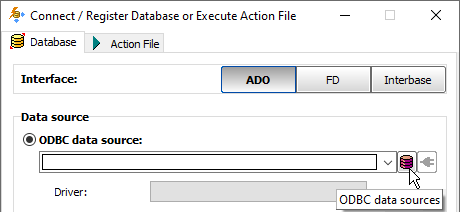
- You can invoke the ODBC Data Source Administrator directly from Exportizer when it was launched in administrator mode:
See also